
Overview
Designing a High-Volume Photobooth Workflow
This project explores how service design and operational UX can transform a potentially chaotic, high-volume physical experience into a calm and joyful one — without building any custom software.
Context
Church Christmas lobby engagement event
My Role
Service Designer · UX Designer · Operational Designer
Duration
2 weeks (planning → execution)
Tools
WhatsApp Business · iCloud Shared Albums · Apple ecosystem (iPhones) · SELPHY Photo Layout · CP1500 printers
Skills demonstrated
Service design · Operational UX · System thinking · Human flow · Tool composition
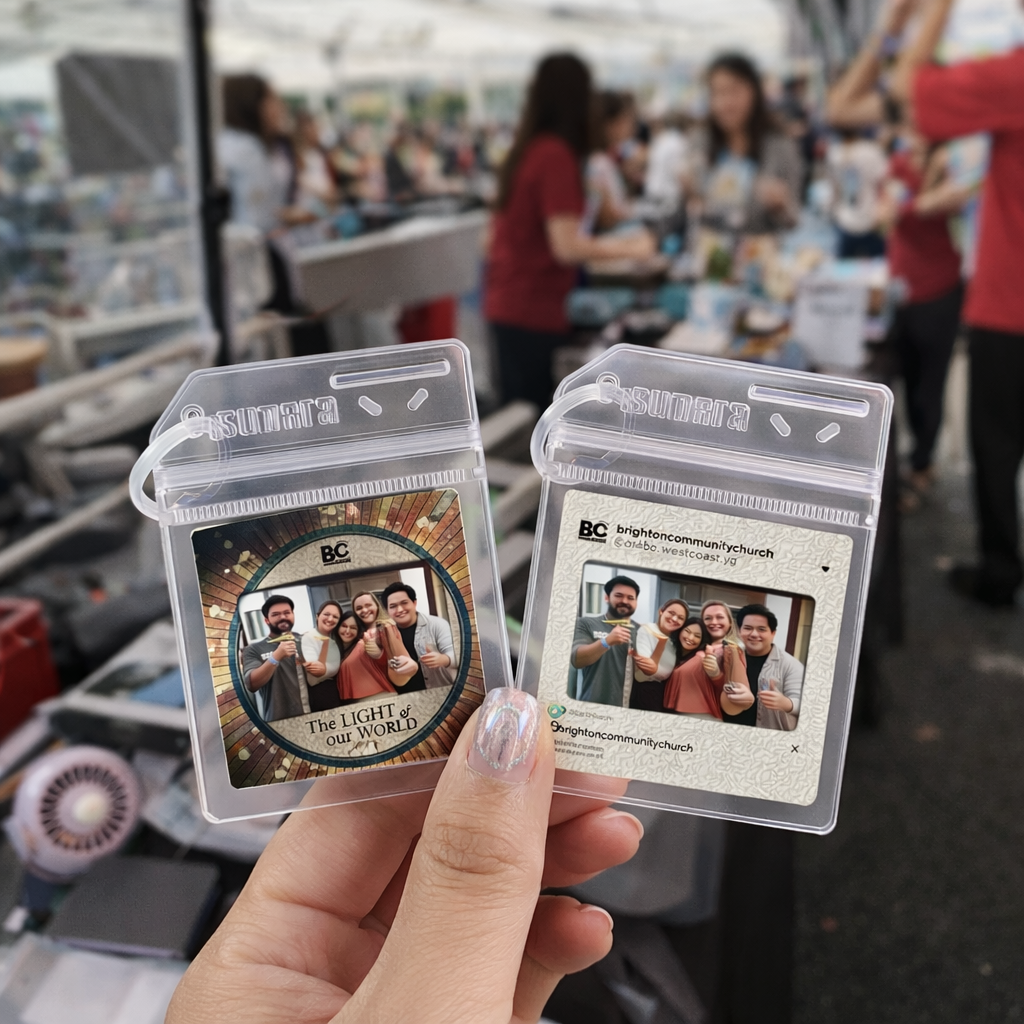
The photobooth was only available for 1 hour (10:30–11:30 AM) between two services, with the 1st service ending and the 2nd service arriving at the same time.
This meant:
- Heavy crowd overlap across all age groups
- High demand for instant photo keychains
- Limited resources: 3 printers and a volunteer crew
Design question
How might we design a photobooth service that remains manageable and enjoyable during peak congestion, with limited time, manpower, and equipment?
Goals & Success Criteria
01. Guest Experience
- Minimal waiting
- Clear, simple instructions
- Easy, stress-free collection
02. Crew Experience
- Clear role separation
- Low cognitive load
- Minimal coordination needed
- Error-proof printing flow
03. Operational
- Reduce peak-time congestion
- Maximise printer throughput
- Use familiar, existing tools
- Avoid custom systems or apps
Key Insights
Through early walkthroughs and scenario mapping, several insights emerged:
Design Strategy
Instead of optimising only for speed during the lobby hour, I designed the experience as a time-distributed service system, shifting demand earlier and simplifying peak-time interactions.
This approach spreads workload across time and reduces congestion at peak moments.
Stage 1
Photo Submission
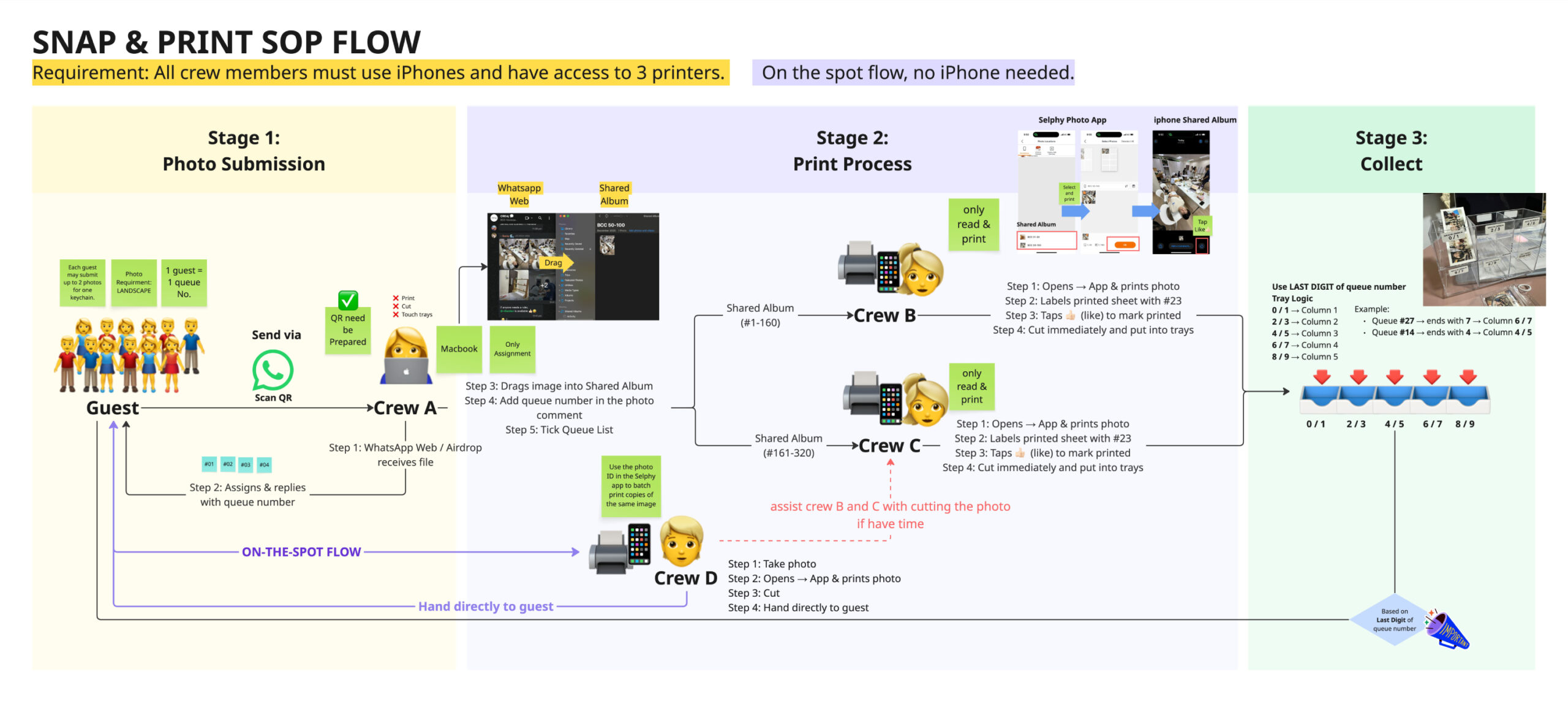
Guests submit photos via WhatsApp only.
Submission rules:
Submission rules:
- Max 2 photos per guest
- Landscape orientation for best print fit
Crew A responsibilities:
- Receive photos via WhatsApp Web
- Assign queue numbers
- Upload photos to iCloud Shared Albums
- Add queue number as a comment
- Reply guests with their queue number
Guests could enjoy the carnival without waiting in line.

Stage 2
Printing Workflow (Backstage)
Printing was distributed across the team using iCloud Shared Albums to reduce coordination overhead and prevent duplication.
Both Crew B and Crew C handled printing, cutting, and tray placement for their assigned queue ranges.
Shared Album Logic
- Comment = queue number
- ❤️ Like = printed
This lightweight system allowed the printing crew to work independently without verbal coordination, spreadsheets, or manual tracking — significantly reducing cognitive load during peak periods.

Stage 3
Collection & Pickup
(Inspired by familiar fast-service pickup logic)
Instead of sorting printed keychains strictly by numerical order, we designed a last-digit tray allocation system, similar to how quick-service restaurants handle high-volume pickups efficiently.
How it works
Each queue number is assigned to a tray based on its last digit.
Each queue number is assigned to a tray based on its last digit.
Example:
– Queue #23 → Tray 2 / 3
– Queue #47 → Tray 6 / 7
– Queue #90 → Tray 0 / 1
After printing and cutting, Crew B and Crew C place the photo sheets into the corresponding tray.
Why this works
– Even distribution of items across trays
– Faster visual scanning for guests
– Minimal sorting effort for volunteers
– Scales naturally as volume increases
– Familiar mental model that requires little explanation
– Even distribution of items across trays
– Faster visual scanning for guests
– Minimal sorting effort for volunteers
– Scales naturally as volume increases
– Familiar mental model that requires little explanation
This significantly reduced congestion at the collection area and enabled confident self-collection even during peak crowd transitions.

Stage 3
Guest Self-Assembly
Guests collect their photo sheets from the tray that matches their queue number and assemble the keychains themselves at a separate self-assembly table.
This decision:
- Reduced workload on volunteers
- Prevented bottlenecks at the pickup point
- Allowed guests to move at their own pace
- Kept the overall system calm and scalable

Full SOP Flow
Operations & Tools
Tools & Tactics Used
This approach avoided unnecessary custom development and demonstrated how existing consumer tools can be intentionally composed into an effective service system.
Outcomes & Impact
Despite tight constraints:
- Hundreds of guests were served smoothly
- No long or stressful queues formed
- Volunteers reported low stress and clarity
- Guests could enjoy the event freely
The system remained manageable even during peak transitions.
Reflection & Learnings
Key Takeaways
These reinforced that service design extends beyond flow — it includes context, environment, and visibility.
Designing with Generative AI
Generative AI played a key role as a thinking and systems-design partner.
Through iterative brainstorming, I explored:
- Crowd-flow scenarios
- Alternatives to Airdrop
- Ways to leverage the Apple ecosystem without building custom tools
- Queue logic inspired by familiar real-world patterns
AI helped accelerate exploration and decision-making, allowing me to arrive at a solution that was simple, scalable, and realistic for a volunteer-run environment.
Rather than replacing design judgment, AI supported faster evaluation of options against real-world constraints.

Final Reflection
“Good UX is often invisible, systems that quietly support meaningful experiences.”
This project strengthened my ability to design service systems under real constraints, balancing guest experience with backstage feasibility while thinking beyond screens into operations and human behaviour. It reaffirmed my belief that good UX is often invisible — systems that quietly support meaningful experiences — even under pressure